Beyond ChatGPT: Building Your Own AI Toolkit
My first real experience with AI was the same as everyone else’s: I typed something into ChatGPT and it gave me an answer that felt like magic. I used it for months, drafting emails, looking up syntax, brainstorming ideas. It was useful. Then, slowly, I started hitting the edges.
The copy-paste cycle got old. I would paste in a chunk of code, get a suggestion back, copy the result into my editor, test it, find a problem, paste the error back in, and repeat. For a quick question that works fine. For a multi-file refactor that touches a dozen files, it is tedious and error-prone. ChatGPT can tell me what to do. It cannot do it for me.
The cost added up too. I was paying for a Plus subscription and still running into usage limits during long sessions. And I was locked into one provider’s model, one provider’s pricing, and one provider’s decisions about what the tool could and could not do.
That frustration led me to build the toolkit I use today: alternative AI models that cost a fraction of what I was paying, a terminal-based AI agent that can actually work on my projects, and a self-hosted AI assistant I control entirely. This post is a practical guide to those tools, what they are, how they fit together, and what you can build with them.
Why look beyond ChatGPT#
The limitations of ChatGPT fall into four categories that matter increasingly as you use AI more heavily.
Cost. ChatGPT Plus is $20/month. ChatGPT Pro is $200/month. For casual use that is fine. For someone using AI as a daily development tool, coding sessions that run for hours, processing large documents, building and iterating on projects, the subscription model becomes expensive relative to what API-based alternatives offer. A single complex coding session can consume hundreds of thousands of tokens, and the per-query economics of a subscription do not always work in your favour.
Token and context limits. Every AI model has a context window, the amount of text it can hold in memory during a conversation. As conversations get longer, the window fills up. When it does, older messages get compressed or dropped, and the quality of responses degrades. In a long coding session, this means the AI gradually forgets what you discussed at the beginning. Heavy users feel this constantly.
Lock-in. ChatGPT is a closed ecosystem. Your conversation history, your custom instructions, your workflow, all of it lives on OpenAI’s platform. When they change the model, change the pricing, or change the features, you adapt or you leave. There is no way to point ChatGPT at a different provider’s model because it does not support that. You get what they give you.
No agency. This is the biggest one. ChatGPT can only respond to text prompts. It cannot read your files, run commands on your machine, deploy code, or interact with your systems. It is a very clever text box. The gap between “AI told me what to do” and “AI did it” is enormous. And you have to bridge that gap yourself, every time.
Alternative models: z.ai and the GLM family#
The first thing I discovered when I started looking beyond ChatGPT was that there are many AI models available through APIs, and they are not all expensive. The one that changed my workflow is z.ai .
z.ai is an API provider that offers GLM models, a family of large language models developed by Zhipu AI, through an Anthropic-compatible API. That last part matters more than anything else in this post. The Anthropic Messages API is the protocol that tools like Claude Code speak. z.ai exposes the same protocol with different models behind it. This means any tool built for Anthropic’s API can point at z.ai instead, with zero code changes. You change one URL and you are using a completely different model family.
The cost difference is significant. Here is a comparison of current pricing across the main options. Note that prices change frequently, by the time you read this, these numbers will likely be outdated. Check each provider’s website for the latest rates.
Subscription plans compared#
All three providers offer monthly subscriptions, but the value per dollar varies enormously.
| ChatGPT Plus | Claude Pro | z.ai Lite | |
|---|---|---|---|
| Monthly cost | $20/mo | $20/mo | $18/mo |
| Quarterly (save 10%) | , | , | $16.2/mo |
| Annual (save 20%) | , | , | ~$14.4/mo |
| Usage relative to Claude Pro | ~1× | 1× | 3× |
| Rate limits | Dynamic | Dynamic | High |
| Models | GPT-4o, o-series | Haiku, Sonnet, Opus | GLM-5.1, 4.7, 4.5-air |
The key number is the usage multiplier. z.ai’s Lite plan at $18/month gives you three times the usage of a Claude Pro subscription at $20/month. I am on z.ai’s GLM Coding Pro-Quarterly Plan, which costs $90 per quarter ($30/month) and covers my daily development work, multi-hour Claude Code sessions, automated pipelines, and the OpenClaw Discord bot, without running out. The same workload on Claude Pro would exhaust its allocation during a single focused coding session.
An important detail: token usage on z.ai is significantly lower than Anthropic’s for equivalent work. I am not sure whether this is due to more efficient tokenisation, smaller context windows, or the way the API counts tokens. But the practical effect is that your quota stretches much further on z.ai for the same tasks. Combined with the higher base allocation, the difference is substantial.
I very rarely hit rate limiting on z.ai with my average use. For context: ChatGPT Plus and Claude Pro are designed for interactive use, a human typing one message at a time. When you are running an AI agent like Claude Code that sends rapid, sequential API calls, reading files, writing code, running tests, iterating, those rate limits become a bottleneck. z.ai’s plans are designed for exactly this kind of automated, high-throughput use.
All z.ai plans are compatible with Claude Code, Cursor, Cline, and other coding tools. They speak the Anthropic API protocol, so the tool does not know it is talking to GLM models instead of Claude. z.ai also offers higher tiers (Pro and Max) with even more usage, as well as a pay-per-token API for usage beyond the subscription.
Per-token pricing (API mode)#
For reference, here is how the per-token costs compare on the pay-per-token API (prices per million tokens, as of April 2026):
| Model | Input | Output | Use case |
|---|---|---|---|
| GLM-5.1 | ~$0.85 | ~$3.40 | Complex reasoning (my Opus-tier) |
| GLM-4.7 | ~$0.28 | ~$1.10 | General tasks (my Sonnet-tier) |
| GLM-4.5-air | ~$0.11 | ~$0.28 | Quick operations (my Haiku-tier) |
| GLM-4.7-Flash | Free | Free | Simple queries, classification |
| Claude 3.7 Sonnet | $3.00 | $15.00 | General tasks |
| Claude 3.5 Haiku | $0.80 | $4.00 | Quick operations |
At these rates, a typical coding session with GLM-4.7 costs roughly 5–10% of what the same session would cost on Claude Sonnet. The free GLM-4.7-Flash tier is particularly useful for automated pipelines where a lightweight model handles classification or routing, my OpenClaw Router uses it to decide which backend should handle each query, and that classification step costs nothing.
Quality. GLM models are competitive for the vast majority of tasks: coding, writing, research, system administration, content creation. The current generation (GLM-5.1 for complex reasoning, GLM-4.7 for general tasks, GLM-4.5-air for quick operations) handles most of what I throw at it daily. There is a gap on the hardest reasoning problems compared to Claude Opus or GPT-4o, complex multi-step proofs, intricate architectural decisions, edge cases that require deep domain expertise. For those, I switch to a stronger model. For everything else, GLM is more than sufficient.
Getting started takes about two minutes. Sign up at z.ai, get an API key, and set two environment variables:
export ANTHROPIC_API_KEY="your-zai-api-key"
export ANTHROPIC_BASE_URL="https://api.z.ai/v1"
That is it. Any tool that expects an Anthropic API key will now talk to z.ai’s GLM models instead. The tool does not know or care that the endpoint changed.
For complete privacy, when you do not want any data leaving your network at all, you can run models locally using Ollama . I described my local LLM workstation build in an earlier post . The trade-off is quality: local models on consumer hardware are noticeably weaker than cloud offerings on complex tasks. But for simpler queries, they work well, and the marginal cost is zero.
Claude Code: not just another chatbot#
The biggest shift in my AI workflow was moving from a chat interface to Claude Code , Anthropic’s AI coding assistant that runs in your terminal. The distinction matters.
ChatGPT is a chat interface. You type a question, it types an answer. The answer exists in the browser, not on your machine. To act on it, you copy, paste, test, and iterate manually.
Claude Code is an agent. It runs in your terminal, which means it has access to your actual file system, your shell, and your network. You describe what you want in plain language, and it can read files, write files, run commands, browse the web, and work iteratively on complex tasks, all without you leaving the conversation.
The website migration#
The example that convinced me was this website. When I migrated steeman.be from its old platform to Hugo, I did not write a single line of configuration by hand. I told Claude Code what I wanted: migrate the site, preserve the content, keep the old URLs working, deploy to the web host. It scraped every page from the live site, converted each HTML page back into clean Markdown, set up the Hugo directory structure, configured the theme, fixed image paths, created URL redirects for old addresses, committed everything to Git, and deployed via FTP.
That would have been days of tedious manual work. Claude Code did it in a focused session while I watched and corrected course when needed. I was not copy-pasting instructions from a chat window. I was directing an agent that had access to the project and could act on it directly.
Not locked to Anthropic#
Claude Code speaks the Anthropic Messages API. Through environment variables, it can connect to any Anthropic-compatible endpoint, including z.ai. This means you get the agent capabilities (file access, shell commands, web browsing) with GLM models instead of Claude models. The combination of z.ai’s pricing and Claude Code’s capabilities is what makes the whole setup work economically for heavy daily use.
Connecting z.ai to Claude Code#
The connection is straightforward. Two environment variables redirect Claude Code from Anthropic’s servers to z.ai:
export ANTHROPIC_API_KEY="your-zai-api-key"
export ANTHROPIC_BASE_URL="https://api.z.ai/v1"
Then start Claude Code as usual:
claudeIt connects to z.ai and uses GLM models. No configuration files to edit, no patches to apply.
Tiered model mapping#
One detail that matters: Claude Code internally uses three model tiers for different types of work. Opus is used for complex reasoning, reviewing code, making architectural decisions, working through difficult problems. Sonnet handles the main workload, writing code, editing files, most of the day-to-day interaction. Haiku covers quick operations, short lookups, formatting, fast tasks where speed matters more than depth.
When using z.ai, these tiers map to appropriate GLM models:
| Claude Code tier | GLM model | Use |
|---|---|---|
| Opus | GLM-5.1 | Complex reasoning, architecture |
| Sonnet | GLM-4.7 | Main tasks, coding, writing |
| Haiku | GLM-4.5-air | Quick operations, formatting |
This keeps quick operations fast and cheap without sacrificing quality on hard problems. The specific model names will likely change by the time you read this, the GLM lineup evolves fast. The principle is what matters: map the heavy lifting to the strongest model and keep the lightweight work on the cheapest one.
The model switcher#
I built cc-switch , an interactive shell script that presents a menu of available AI backends, fetches the live model list from each provider, and lets me pick a model using arrow keys. Once selected, it configures the right environment variables and launches Claude Code.
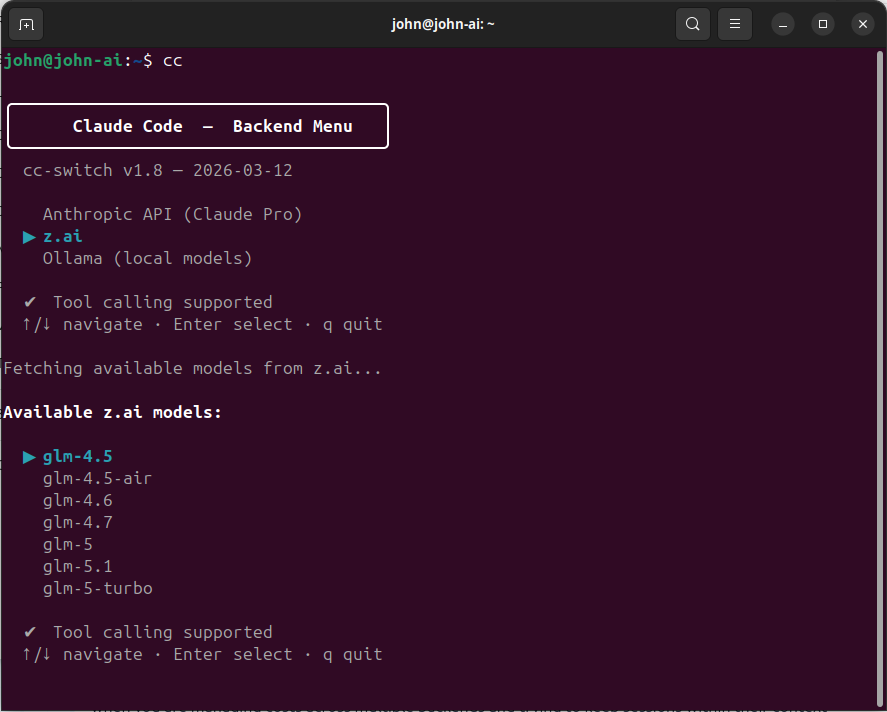
I use three backends:
- z.ai (GLM models): my primary backend for daily work. Cheap, high limits, good enough quality for most tasks.
- Anthropic (Claude Pro subscription): for deep reasoning: reviewing GLM’s output, validating complex designs, and working through architecture decisions. The Pro subscription has usage limits I hit regularly, so I am deliberate about when I use it.
- Ollama (local models): for offline work or complete privacy. Quality is lower, but the marginal cost is zero.
The multi-backend approach means I am never locked in. If one provider raises prices or degrades quality, I shift work to another. I described the full setup in my post about my custom Claude Code configuration .
Claude Code for system management#
Claude Code is not just for writing application code. Because it can read files, run commands, and interact with the system, it is a capable system administration assistant. This is something ChatGPT simply cannot do. It can tell you about configuring backups, but Claude Code can actually configure them.
The backup system#
When I built my Linux backup strategy with Borg , I described what I needed to Claude Code: backup scripts with deduplication and compression, automated scheduling, retention policies, email alerts on failure, and a status dashboard. It implemented the full stack, the backup scripts themselves, a monitoring service that checks backup health every few hours, email notification when something goes wrong, and a status script that reports the state of all backup jobs across multiple machines.
The result is a backup system I trust. Not because I hand-wrote every line, I did not, but because I reviewed every line, tested the failure modes, and iterated on the design through conversation. Claude Code handled the implementation; I handled the judgement.
Server and infrastructure management#
I also use Claude Code for managing KVM virtual machines, Docker containers, systemd services, cron jobs, and network configuration. If a service is misbehaving, I can ask Claude Code to inspect the logs, check the running processes, diagnose the issue, and implement a fix, all through conversation. I review the proposed changes before they go into production, but the diagnosis and initial implementation are handled by the AI.
This only works because Claude Code runs in the terminal and has access to the machine. A web chat interface cannot inspect your systemd journal. It cannot run docker logs. It cannot edit your nginx configuration. The difference between an AI that gives advice and an AI that acts on your system is the difference between a consultant and a team member.
Building things, not just chatting#
The shift from “asking AI questions” to “building things with AI” is the most significant change in how I work. Here are some of the tools Claude Code has helped me build.
Local audio transcription#
I built a Docker container that transcribes audio with Whisper, aligns every word to a precise timestamp, identifies who said what using speaker diarisation, and generates structured summaries with decisions and action items. It runs entirely on my own hardware, no audio leaves the machine. A 42-minute recording processes in about two minutes. It handles Flemish dialect, supports domain-specific vocabulary for technical contexts, and produces speaker-labelled output.
AdGuard Home Assistant dashboard#
An integration for Home Assistant that monitors DNS queries from my AdGuard Home instance. It shows real-time LAN activity, highlights blocked queries, and is compatible with HACS (the Home Assistant Community Store). A practical IoT tool that would have been a weekend project to build from scratch.
Basement inventory labelling#
When I needed to label hundreds of component containers in my basement, Claude Code helped me build a LibreOffice macro that drives a Dymo thermal label printer. It solved orientation problems I had been wrestling with, handled the printer’s quirks, and turned a tedious manual task into something that just works.
Call Detail Record processing#
A CLI tool that processes Call Detail Records, splitting output by customer, applying pricing uplift rules, and generating Excel-compatible reports. The kind of utility that is too specific to find an off-the-shelf solution for, but straightforward to build when you can describe the requirements clearly and have an AI implement them.
The pattern across all of these: I described the problem, wrote a clear specification, and let Claude Code implement it in phases. I reviewed the output, tested it, and iterated. Each tool took a focused session rather than a multi-day project.
OpenClaw: your own AI assistant, on your own server#
Beyond Claude Code, there is another tool in my toolkit that serves a different purpose. OpenClaw is a self-hosted AI agent platform created by the same team behind Coolify (the popular self-hosting platform). It runs in Docker and provides a ChatGPT-like experience that you control entirely.
Why self-host an AI assistant?#
Privacy. No conversation leaves your network. Your queries, your documents, your context, everything stays on your infrastructure. For anything sensitive, this matters.
Control. You choose which models to use, what limits to set, which channels to enable, and what the AI can access. When a provider changes their pricing or terms, you decide whether to follow.
Cost. OpenClaw can connect to local models via Ollama for queries that do not need top-tier reasoning quality. Those queries cost nothing. For more complex tasks, it connects to cloud providers, including z.ai, and you control which provider handles what.
Availability. No provider outages. No rate limits you did not set yourself. No terms-of-service changes that remove features you depend on.
What it supports#
OpenClaw is not limited to one AI provider. It supports over fifteen: Anthropic, OpenAI, z.ai, Google Gemini, Mistral, xAI (Grok), Groq, Cerebras, Ollama, and more. You can configure multiple providers simultaneously and let the agent choose the best one for each query.
It also supports channels, messaging platforms that the AI can respond on. Discord, Telegram, Slack, WhatsApp. Instead of opening a special app to talk to AI, you send a message in a channel you already use.
Additional capabilities include a browser tool for web browsing (the agent can navigate websites, read content, and fill in forms), conversation memory with local vector embeddings (so it remembers previous conversations), and a web UI for direct interaction.
Running it#
The setup is a single Docker command:
docker run -d --name openclaw \
  -p 8080:8080 \
  -e ANTHROPIC_API_KEY=your-api-key \
  -e AUTH_PASSWORD=changeme \
  -v openclaw-data:/data \
  coollabsio/openclaw:latest
Open port 8080 in your browser, log in, and you have a working AI assistant. You can add providers through the web UI, configure channels for Discord or Telegram, and the assistant is available wherever you are.
My setup#
My OpenClaw instance runs on a dedicated VM. It is connected to my local Ollama instance for free queries and to z.ai for more complex tasks. The Discord channel is where I use it most. I have a bot called @kreeft that lives in a Discord server. I send it a message from my phone or my laptop, and it responds using whatever model is appropriate. It remembers previous conversations, can browse the web, and is available 24/7 without me opening any special application.
For someone coming from ChatGPT, OpenClaw is the self-hosted alternative that gives you the same conversational experience with full control over the infrastructure.
The OpenClaw Router: optimising cost with smart routing#
Once you have multiple AI backends, a local model, a cheap cloud model, and a strong cloud model, the question becomes: which one handles each query? Most tools send every request to the same backend. That is wasteful. “What time is it in Tokyo?” does not need a 30-billion-parameter model. “Refactor this authentication module” probably does.
I built the OpenClaw Router to solve this. It is a small FastAPI proxy that sits between the client and the AI backends, classifies each incoming request by complexity, and routes it to the cheapest backend that can handle it.
Client (Claude Code, OpenClaw, custom script)
     |
     v
OpenClaw Router (FastAPI proxy)
     |
     +---> Ollama (simple requests, free)
     +---> z.ai GLM-4.7 (medium requests, cheap)
     +---> z.ai GLM-5.1 (complex requests, moderate)
How it works#
A lightweight classifier model, a small model that runs locally, evaluates each incoming request and assigns it a complexity score: simple, medium, or complex.
| Complexity | Examples | Backend | Cost |
|---|---|---|---|
| Simple | Greetings, quick lookups, formatting, classification | Local Ollama | Free |
| Medium | Coding assistance, research questions, drafting | z.ai GLM-4.7 | Cheap |
| Complex | Multi-step reasoning, architecture, debugging | z.ai GLM-5.1 | Moderate |
The router speaks OpenAI Chat Completions on its public side and translates to whatever format the upstream needs. z.ai only ships an Anthropic-compatible API, so the router handles the OpenAI-to-Anthropic format conversion, including streaming, on the fly. To the client, it looks like a standard OpenAI endpoint. You point your tool at http://router:4100/v1 and everything works.
The cost impact#
If 60% of queries are simple (handled locally for free) and 30% are medium (handled by cheap GLM models), the overall cost drops dramatically compared to sending everything to one expensive provider. For a self-hosted Discord bot that handles chitchat alongside real questions, the savings are significant.
Setting up the router is optional. It is the kind of optimisation you add when you are comfortable with the basics and want to squeeze more value out of the system. If you are just getting started, skip it for now. It will be there when you need it.
Where to start#
If you are currently using ChatGPT and want to explore what else is out there, here is a progressive path that builds one step at a time.
Step 1: Try z.ai with Claude Code. Get an API key at z.ai , set the two environment variables, and install Claude Code . Start a session, ask it to do something in your project directory. This takes five minutes and costs almost nothing. You will immediately see the difference between a chat interface and an agent that can act on your files.
Step 2: Add backend switching. Install cc-switch and set up multiple backends. Experience the difference between providers for different tasks. Switch to Anthropic when you need deep reasoning, stay on z.ai for everything else.
Step 3: Self-host OpenClaw. Run the Docker container, connect it to Discord or Telegram, add z.ai and/or Ollama as providers. You now have a private AI assistant available through the messaging apps you already use. The setup takes about fifteen minutes.
Step 4: Add the router. When your OpenClaw instance is handling a mix of trivial and complex queries, add the OpenClaw Router to route each query to the cheapest sufficient backend. Start with two tiers (simple and complex) and expand from there.
You do not need to do all of this at once. Each step adds value independently. Start with the first one, it takes five minutes, and see where it leads.
Closing thoughts#
The AI landscape is moving fast. The specific tools and models I have described here will evolve. z.ai’s model lineup will change. Claude Code will gain features. OpenClaw will mature. The principles will not:
- Avoid lock-in. Use tools that support multiple providers. When one raises prices or degrades quality, switch.
- Use the cheapest model that solves your problem. Not every query needs the most expensive model. Smart routing saves money without sacrificing quality where it matters.
- Keep control of your data. Self-hosting is not just for privacy enthusiasts. It means you decide what happens to your conversations, your context, and your usage patterns.
- Build tools, not just ask questions. The shift from “AI told me what to do” to “AI did it” is the most productive change in how I work.
Every project I described in this post started with “I wonder if…” and a few minutes of setup. The barrier to moving beyond ChatGPT is lower than it seems. The tools are free or cheap, the documentation is good, and the results, at least in my experience, are worth the effort.
If you want to go deeper into any of these topics, my posts about managing my website with Claude Code , my custom Claude Code setup , and building a local LLM workstation cover each area in more detail. The code for cc-switch and the OpenClaw Router is on my GitHub.